
Your Complete Guide to the FIRST in Texas Waiver and Event Readiness
We understand there’s been some confusion about why two different waivers are required to participate in Texas events. We want to provide some clarity on why two are needed, why it matters, and how to complete the process easily! Read below to learn about:
-
Why does FIRST in Texas require a separate waiver?
-
Who needs to sign a FIRST in Texas waiver?
-
How do I sign the FIRST in Texas Waiver?
-
How do I prepare for my FIRST in Texas event?
We know this process can feel like extra work for coaches, mentors, and volunteers. It adds a few more steps to an already busy season, and we want to acknowledge that up front. Our goal isn’t to create barriers, but to make sure every requirement has a clear reason and purpose: protecting teams, volunteers, and event partners while keeping everyone safe and supported.
Why Two Waivers?
FIRST HQ has always required a Consent & Release form and a team roster to verify that every participant is cleared and ready for competition. That process is handled through the FIRST Dashboard and is standard across all 50 U.S. states and across more than 30 countries worldwide.
However, Texas has unique legal requirements. The national FIRST HQ Consent & Release is a general assumption-of-risk form that includes language not permitted under Texas law. To comply with state requirements, FIRST in Texas uses its own state-specific form to maintain the same level of protection intended by the HQ waiver while meeting Texas legal standards and ensure stronger safeguards for everyone involved.
- Texas law is different. The national form doesn’t include the legal protections Texas allows.
- Protection for everyone. Texas law permits stronger protections to help safeguard students, parents, coaches, volunteers, hosts, partners, and FIRST in Texas in resolving disputes.
- Contract obligations. FIRST in Texas is expected to protect our event partners in the event of a claim, which requires the use of a Texas-specific agreement.
In short, all participants (students, coaches, mentors and volunteers) must complete both forms, the FIRST HQ Consent & Release and the FIRST in Texas waiver to ensure full compliance and protection for everyone involved.
Who Needs to Sign the FIRST in Texas Waiver?
A FIRST in Texas waiver is required for all team members, coaches and volunteers who attend a FIRST in Texas event.
Team Contacts: Coaches, mentors, and other adults affiliated with a team only need to sign the waiver once after creating an account in the FIRST in Texas Coach Portal.
Team Members: The Coach will send a unique link to their team’s FIRST in Texas waiver. A parent or guardian will sign the waiver. A waiver is required for each team that the student is affiliated with. When a student turns 18, the student will need to re-sign as an adult participant.
Volunteers: Stay tuned for additional details that will be shared with all registered volunteers soon.
How do I Sign the FIRST in Texas Waiver?
We improved the previous system by integrating the waiver process directly into our new FIRST in Texas Coach Portal:
For Team Contacts such as Coaches who will attend a FIRST in Texas event:
-
-
Log into the Coach Portal. View Team Dashboard.
-
Click “Sign My Waiver” to access and sign your FIRST in Texas waiver.
.png)
- Once complete, your waiver status will appear on your Team Dashboard. This is only completed once, even if you are affiliated with multiple teams.
-
For Team Participants:
-
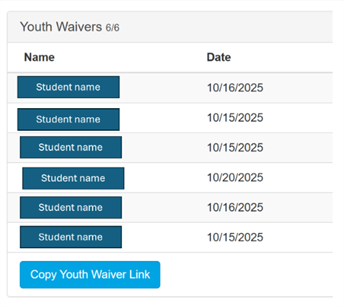
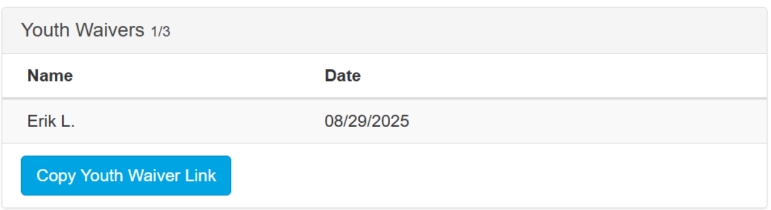
In the Team Dashboard, coaches will see a “Youth Waiver” section.
-
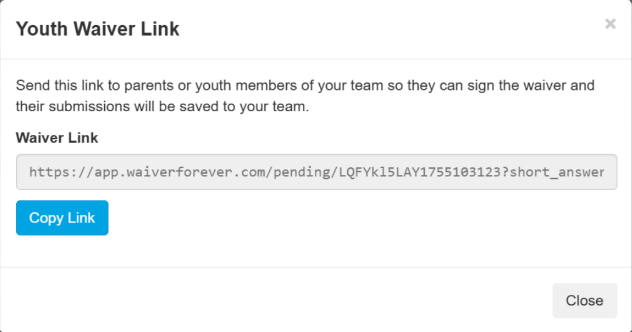
Click “Copy Youth Waiver Link” to get a unique team link. If you have multiple teams, make sure to share the link that is unique to each team.
-
Share this link with parents or guardians to complete waivers for minors.
-
Students over 18 should complete their own waiver directly.
-
The dashboard will show how many FIRST in Texas waivers are complete compared to the number of FIRST Inspires waivers on file. In the example below, 1 FIRST in Texas waiver is on file compared to 3 on the FIRST Dashboard.
Need help? Use the “Contact Us” button at the top of the portal. A few known issues:
- If a parent has filled out a waiver multiple times, that student will be listed multiple times. We are working on a fix for this.
- A team member who is 18 or over who fills out the waiver may experience some delay in having their name appear in the Coach Portal Youth Waivers list.
How do I Prepare for my FIRST in Texas Event?
To support teams preparing for an event, we are excited to announce a new FIRST in Texas Event Roster and Readiness Form! The form is found in the Events area and can be accessed by clicking “Roster” for events that your team is assigned to.
At every event, we use rosters to confirm which students and adults are onsite and that all required Consent & Release forms have been completed. This helps ensure both safety and compliance across all FIRST in Texas events.
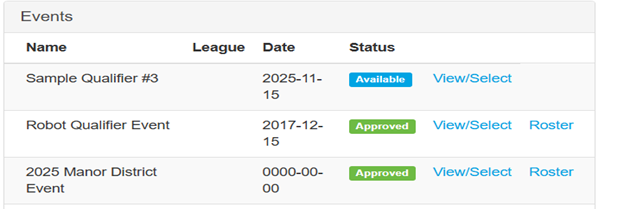
The FIRST in Texas Roster include:
- Team Status: Provide registration and payment status.
- Team Contacts: List all coaches and mentors who are affiliated with the team and have signed FIRST in Texas waiver
- Team Roster: List all team members who are affiliated with the team and have a signed FIRST in Texas waiver
Our goal is to make it as easy as possible to review your team status. We also plan to use this form to support a smoother event check-in process. More program-specific information coming soon.
Finally, we recognize that this process isn’t perfect yet but improving it is a top priority for us. We want our community to know that we’re actively developing better tools to simplify the waiver and roster system and reduce how often teams need to complete forms. While those improvements won’t be ready until next season, we appreciate your patience and cooperation and want to assure you that we’re committed to making your experience easier over time.