

Thank you for participating in FIRST LEGO® League this season! Click below to access resources or scroll down for contact and office hour details.
How Advancement to State Championship Works
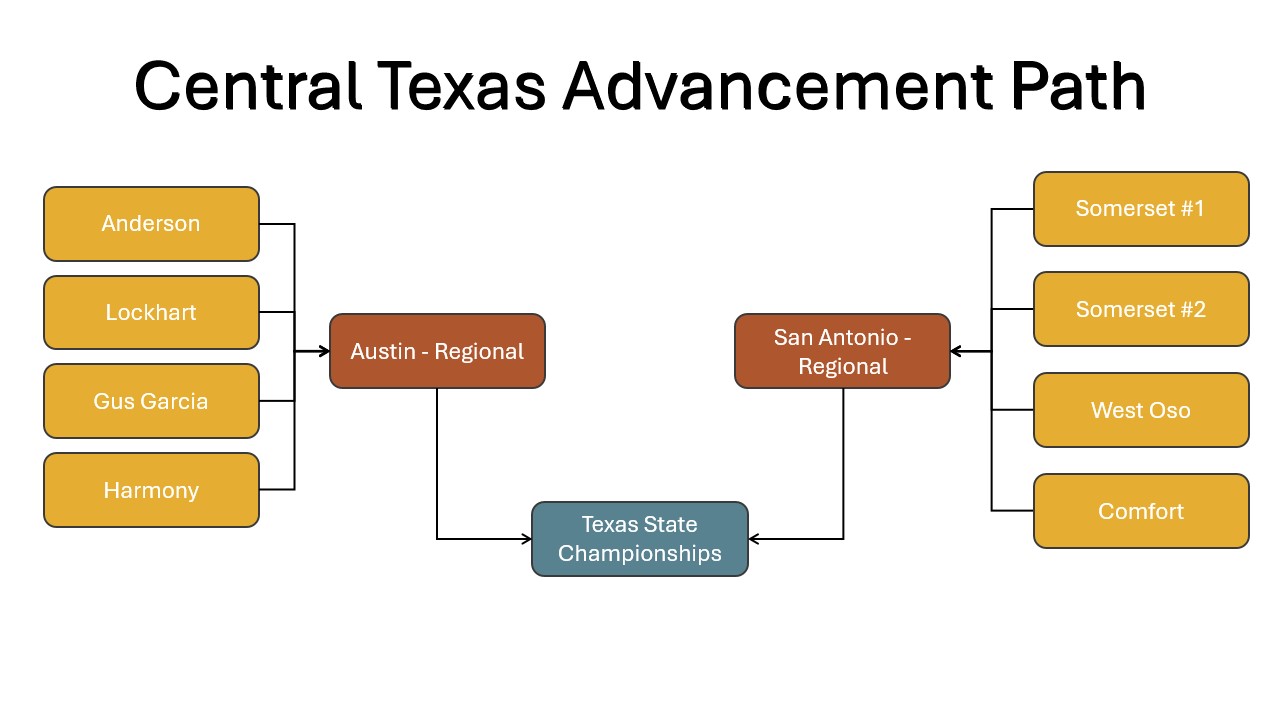
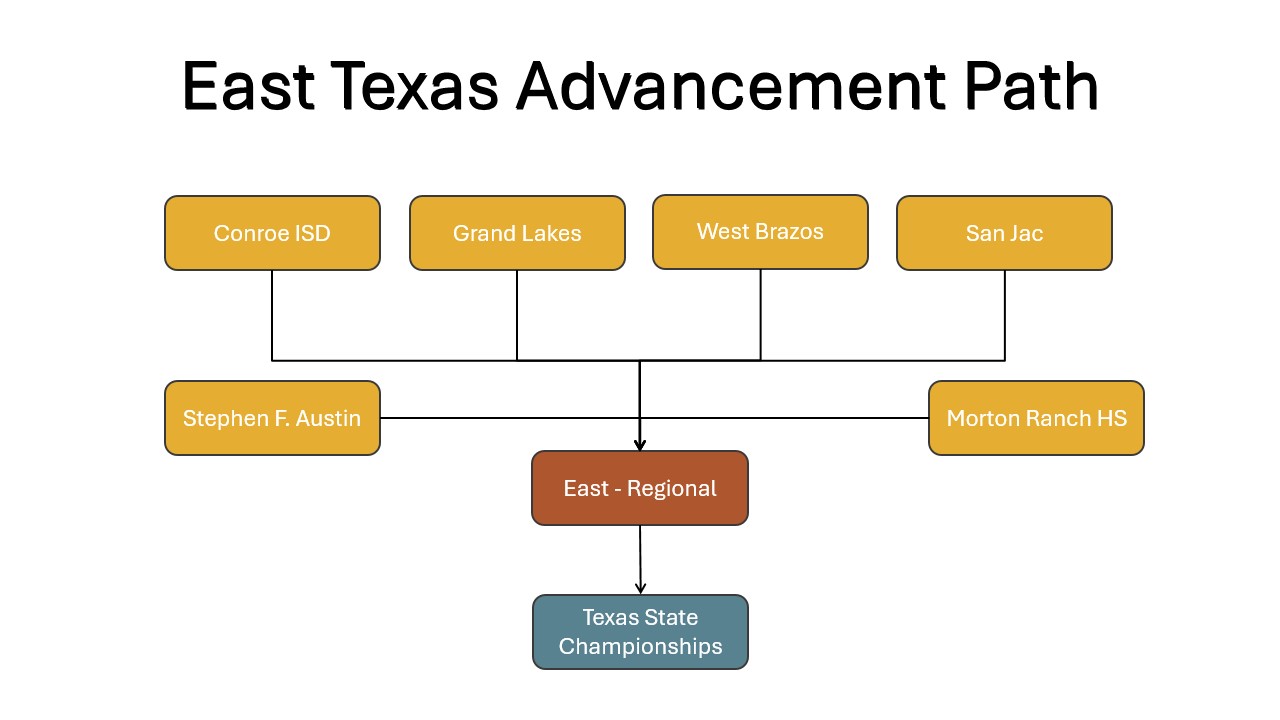
Advancement to the State Championship is designed to be proportional across Texas so teams have an equal opportunity to advance, regardless of where they compete. Teams advance through the season in two steps:
-
Qualifier Tournaments → Regional Tournaments: one-third of teams at each qualifier advance to a Regional Tournament.
-
Regional Tournaments → State Championship: From each region, 15% of teams advance to the State Championship.
Regional Tournaments
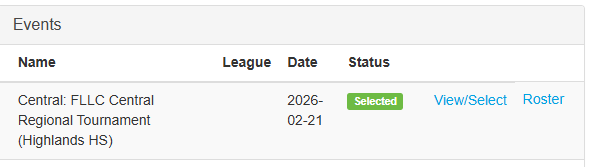
After each qualifier, teams receive an email confirming advancement status. No action is required from teams. Advancing teams are then added to the event in the FIRST in Texas Coach Portal. The status is changed to a green "Selected" when you have been added, and the "Roster" button will appear next to the event. Click on the "View/Select" button for more specific details on your assigned event.
Unable to attend or have questions? Reach out to your PDP for help or [email protected].
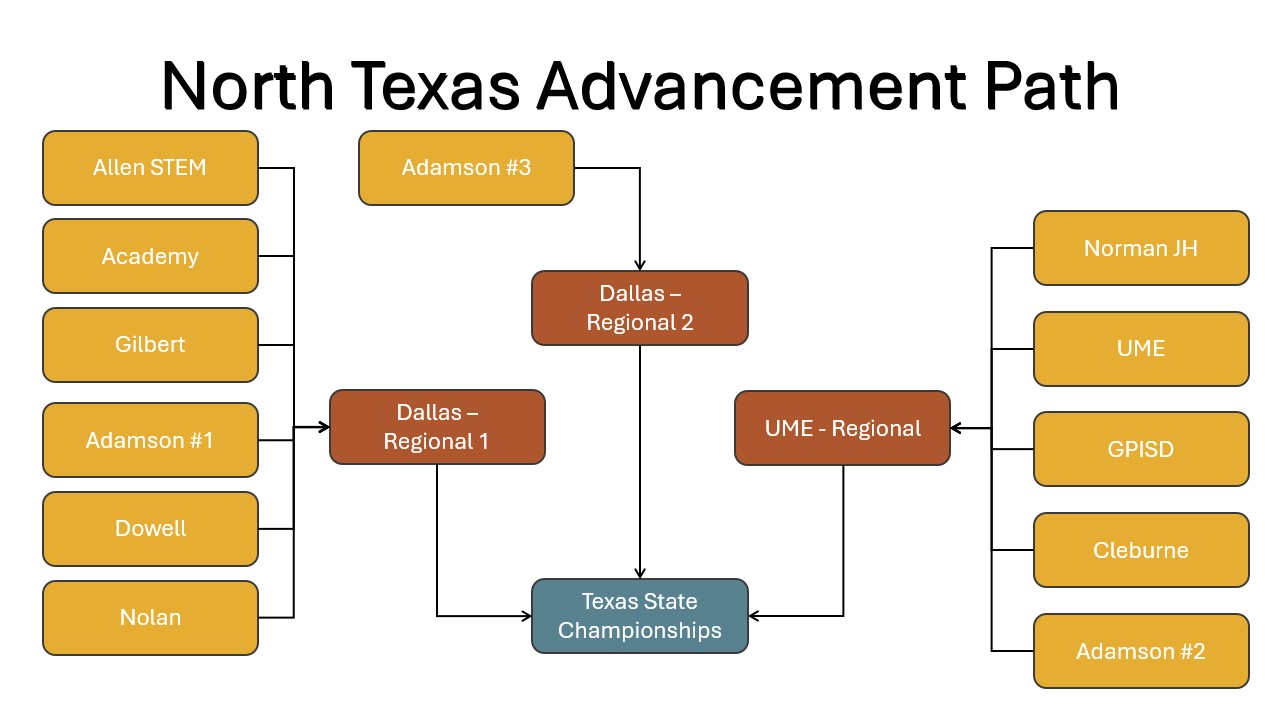
Dallas Regional 1 is February 7th at Adamson High School
Dallas Regional 2 is February 21st - Dallas ISD Venue TBD
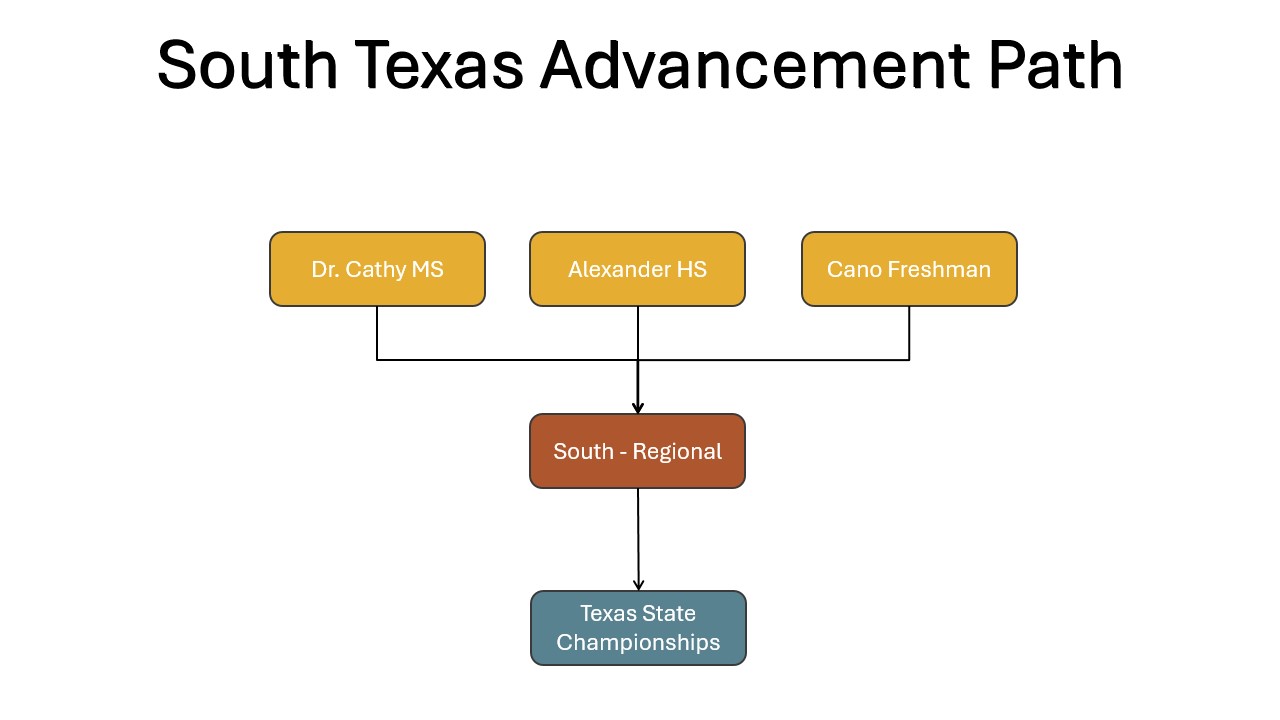
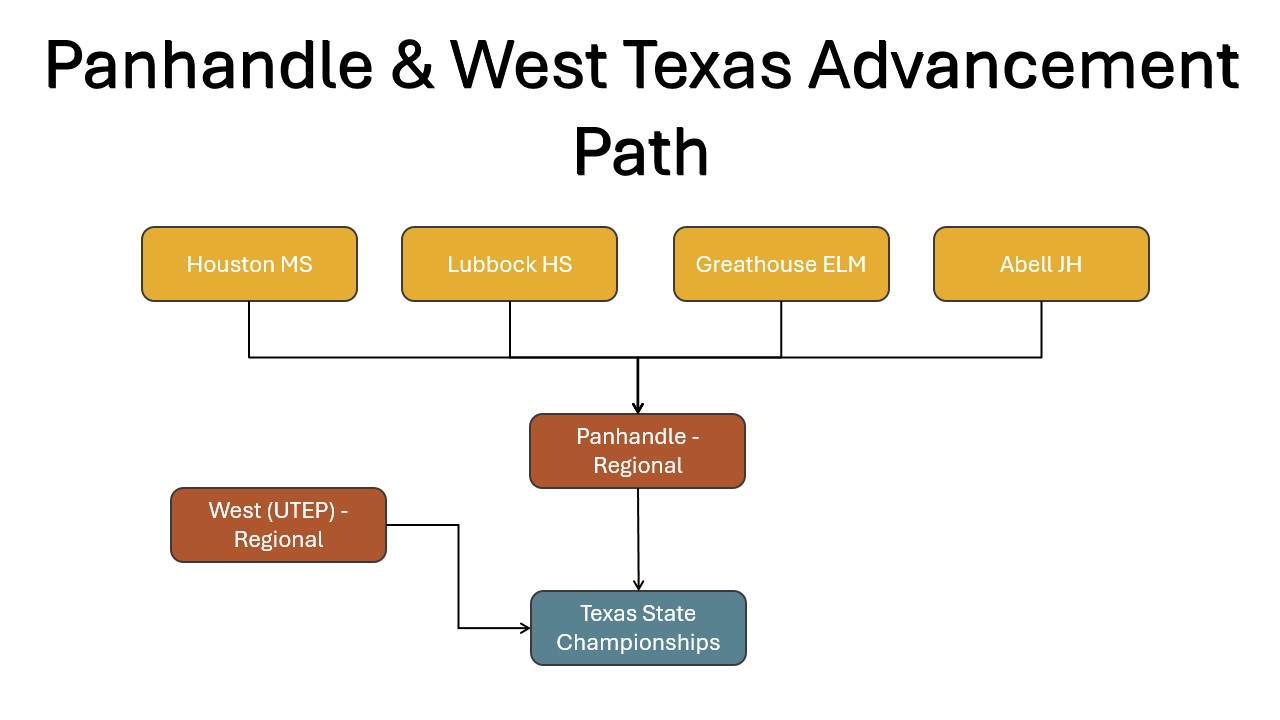
State Championship
Date: March 7
Location: Marcus High School – Marauder Activity Center
5707 Morriss Rd
Flower Mound, TX 75028
We’re looking forward to welcoming teams from across Texas for a high-energy day celebrating innovation, teamwork, and FIRST Core Values. More event details and schedules will be shared as we get closer to the event.
Judge and Robot Game Advice with State Key Volunteers
2nd Tuesday of Every Month
7:00 PM
State Head Referee Jay Jordan ([email protected])
Judge Advisor Hector Linares ([email protected])
Announcement Archive
|
||
|
We are proud of the impact FIRST LEGO League has made over the past several years under the leadership of Dr. Dee Wallace.
As we head into the second half of the FLL season, we have an important update to share. Dr. Wallace is no longer with FIRST in Texas and will be pursuing a new role with FIRST Headquarters. We are grateful for her time supporting FIRST LEGO League and wish her continued success in her next chapter.
Effective immediately, Erika Diggs will serve as Interim FIRST LEGO League Program Leader and Interim Central Program Delivery Partner. With more than 12 years of experience with FIRST, including most recently as FIRST Access Program Leader, we are confident that her leadership will provide stability and guide the program through the reminder of the season. She can be reached at [email protected] and will be monitoring any emails going to [email protected]
Teams in all other regions will continue working with their current Program Delivery Partners, and our commitments to communication, event delivery, and team support across Texas remain unchanged.
Thank you for your understanding and continued support as we move forward into the final stretch of our FLL season.
Welcome to the January FIRST® LEGO® League 2.0 Qualifiers!
We’re excited to kick off a new season of innovation, teamwork, and discovery as teams prepare to compete in the January FLL 2.0 Qualifier events. The qualifiers showcase months of hard work as students demonstrate their skills in the Robot Game, Innovation Project, and Core Values. We look forward to celebrating student creativity, problem-solving, and collaboration at each January qualifier. Thank you for being part of the FIRST in Texas LEGO League community, and best of luck to all teams as you prepare to compete!
Office Hours Update
As we prepare for our January and February events, please note that the Tuesday FLL office hours and agendas will change for the remainder of the season. The time for each session will remain from 7:00 – 8:00 pm.
1st Tuesday - PDP meeting: FiT PDPs administrative team meeting
2nd Tuesday - Judge and Robot Game Advice with State Key Volunteers: Session will include guidance and best practices for judging and robot game execution, led by our State Key Volunteers. This meeting is designed to promote consistency and clarity across events. All teams are welcome to attend.
3rd Tuesday - Regional and State Planning Committee Meetings: PDP, regional Key Volunteers, and local host meeting. By invitation only
Advancing Teams
Teams are advanced based on their combined performance across all three judging areas (Core Values, Innovation Project, and Robot Design) and their robot scores. 1/3 teams will advance from each qualifier. All team advancement decisions are final. Even award-winning teams will not advance to the next level if they are not well-rounded. It is common for a team to excel at Robot Performance, including earning a top score, yet not advance to the next level of events if they are not well-rounded. Sometimes, a team that did not win any awards may advance if they performed well across all areas.
Referee’s Corner: Is there a 12" height limit during Launch?
No, the height limit only applies during the pre-match inspection as detailed in Rule 8 of the Robot Game Rulebook (pg. 15): “During the pre-match inspection, the referee will check that all team equipment fits within the two launch areas and under a height limit of 12 in. (305 mm).”
There is no other mention of a height limit in the Robot Game Rulebook. Therefore, by the brown callout box on Page 13, IMPORTANT, "If a detail is not mentioned, it does not matter."
The robot and its attachments can be as tall as the team wants, as long as they fit entirely in the Launch Area for a valid launch.
The FIRST® in Texas FIRST® LEGO® League Qualifier Season kicks off tomorrow, December 6, 2025, with events taking place in Austin, Allen, and Plano. We look forward to seeing teams showcase innovative and inspiring solutions to challenges in archaeology during this year’s UNEARTHED™ season!
Teams advancing from their area qualifiers will compete at a Regional FLL Tournament, with the journey culminating at the Texas State Championship on March 7, 2025, in Stafford, Texas.
Advancement Opportunities from the State Championship
Texas FLL teams will have the chance to advance to several prestigious off-season events:
- 2 teams – World Festival
- 1 team – Korea
- 2 teams – Canada
- 2 teams – California
- 1 team – Georgia
- 2 teams – WAFFLE
- 3 teams – Liberty Science Center, New Jersey
Volunteers Needed
We are looking for volunteers to help make our Local Qualifiers, Regional Tournament, and State Championship unforgettable for FIRST LEGO League students. Volunteers bring events to life, support teams, and help students grow in confidence, leadership, and STEM skills.
If you are ready to make an impact, we would love to have you on the team. Sign up to volunteer: https://firstintexas.org/Volunteer
Thank you for helping create opportunities and experiences that truly make a difference.
The FLL UNEARTHED Season officially begins on December 6, 2025. We are excited to share that new features have been added to the Coach Portal to help streamline communication throughout the season.
Your regional PDP will send event announcements directly through the Coach Portal. You will receive an email from FIRST in Texas, and the same announcement will also be visible in your Coach Portal.
Event Ready
Please make sure your team is fully event ready. Your FIRST Inspires dashboard must be completely up to date.
- Each team is required to have two coaches with completed YPP background checks, and all team members must be correctly added to your roster.
- Both you and your team must also complete the FIRST in Texas waiver. A printed FIRST Inspires roster and a printed FIRST in Texas roster are required at check in on the day of the competition
Judging
This season, some Qualifier events will offer in person judging and others will use virtual judging. All Regional events will include in person judging only. Judging details for your specific event can be found in the Coach Portal.
Effective immediately, Dr. Dee Wallace, our FLL Program Leader, will be serving as the Interim Program Delivery Partner (PDP) for Central Texas. Dee will support teams and event hosts in the region and serve as your main point of contact for all event logistics, communications, and team questions. You can reach Dr. Wallace at [email protected]
Teams in other areas will continue to work with their existing Program Delivery Partners, and our commitments for events, communication, and team support across Texas remain the same.
Registration & Event Selection
FLL Explore: Festival registration selection opens Friday, October 31, 2025. Be sure to sign up early to secure your spot!
FLL Challenge: Event selection remains open until November 15, 2025. Get your team ready and choose your event before the deadline!
Volunteer Training
Referees, Head Referee, and Tournament Directors/Host
Date: Saturday, November 1, 2025
Time: 09:00 AM - 11:00 am Central Time (US and Canada)
Head Referee Follow-Up Session
Date: Saturday, November 1, 2025
Time: 11:00 am - 11:30 am Central Time (US and Canada)
Join Zoom Meeting https://us06web.zoom.us/j/83826060065
Judge, Judge Advisors, and Volunteer Coordinator
Date: Saturday, November 8, 2025
Time: 9:00 AM - 11:00 am Central Time (US and Canada)
Judge Advisor Follow-Up Session
Date: Saturday, November 8, 2025
Time: 11:00 AM - 11:30 am Central Time (US and Canada)
Join Zoom Meeting https://us06web.zoom.us/j/88941787515
We know there’s a lot to keep track of before your first competition. To help your team get event ready, we’ve outlined the key action items below. Each step ensures your team is fully registered, compliant, and prepared for check-in at your first event.
FIRST Team Registration
Every team must register through the official FIRST Team Registration System. To be considered eligible (“event-ready”), teams must:
-
Pay the Season Registration Fee to FIRST.
-
Have both Lead Coach/Mentor 1 and 2 complete the required Youth Protection screening
-
Be in good standing in the FIRST system
FIRST in Texas Season Fee
Every team must register with FIRST in Texas and pay the FIRST in Texas Season Fee.
-
Create/login to FIRST in Texas account: After registering with FIRST all Lead Coaches, Team Mentors, and Admin will receive an email to join the FIRST in Texas coach portal system
-
Register the Team: Fill out the team profile information to start the registration process
-
Pay the Texas Season Fee: this covers registration in leagues (or 2 qualifiers for some teams in North).
-
Pay Additional Event fees: Participation in events beyond what is covered in the initial Season Fee will incur additional costs. Please visit https://firstintexas.org/first-tech-challenge for specifics about event costs (additional details about season fees included in this newsletter)
Need help navigating how to pay using the FIRST in Texas Coaches Portal? Check out: New Coach Portal Overview which provides step by step instructions on how to use our system!
Ensure Team Members and Mentors are Registered to the Team in the FIRST System
Team Members and Mentors must be registered to a team through the FIRST Dashboard.This process ensures all students and adults affiliated with a team have a completed FIRST Consent and Release form.
For information on how to Register Youth to your team, please review the Youth Registration System Overview Resources. Review the Team Roster in the FIRST Dashboard to confirm that your team members are registered.
Ensure Team Members, Coaches, and Mentors have Completed FIRST in Texas Waivers
FIRST in Texas requires a separate Consent and Release Form from the standard FIRST waiver due to Texas-specific legal requirements. This form must be completed by all participating students, coaches, and mentors before attending any event.
Each team has a unique waiver link available through the FIRST in Texas Coaches Portal. Coaches can share this link with parents and verify completion for their team directly from their dashboard.
Step-by-step instructions for locating and sharing your team’s waiver link are available in the New Coach Portal Overview, which also covers how to register, submit payments, and manage team information.
Age Requirements & In-Person Judging
Over the past several weeks, our staff has collaborated closely with the FLL Advisory Council to review feedback and identify key areas for improvement. While this work is ongoing, we’re excited to announce two important updates for the upcoming season: a clarification of our age and grade requirements, and a strategic transition to in-person judging across all events.
Age Requirements
To maintain alignment with FIRST®, the following grade and age requirements apply:
FIRST LEGO® League Explore is open to students in grades K - 3.
FIRST LEGO® League Challenge is open to students in grades 4–8, regardless of age. We recognize that eligibility for 8th graders has been a point of concern in previous seasons and appreciate the feedback from our community. We want to reassure teams that 8th graders remain eligible to participate, and there are no plans to reverse this decision.
For homeschooled students who do not follow traditional grade levels, participants must be at least 9 years old by September 1 to compete in FLL Challenge.
In-Person Judging
FIRST in Texas is committed to providing every student with a meaningful, engaging, and equitable competition experience. To strengthen the quality and consistency of that experience, we are excited to announce a transition to in-person judging.
Beginning in the 2025–2026 season, the State Championship and all Regional Events (except for South) will move to in-person judging. In addition, every effort will be made to transition as many Qualifier Events as possible to in-person formats, with the goal of achieving 100% in-person judging across the state by the 2026–2027 season.
We recognize a shift to in-person judging demands additional coordination and support. To ease this transition, we are committed to assisting with volunteer recruitment, providing clear event guidelines, and defining volunteer roles and expectations. We will also share statewide standards for judging and the overall event experience to ensure that every student enjoys a high-quality, inspiring, and equitable competition.
What are the different kinds of FLL Events?
In FIRST® LEGO League Explore, students in grades K–3 work together to research a real-world theme, build and program a LEGO model, and share their project at an event called a Festival. Festivals are designed to be fun celebrations, where teams present their work, meet other teams, and learn from one another in a non-competitive environment. Explore teams are encouraged to attend more than one Festival throughout the season. Each Festival has a $65 registration fee.
In FIRST® LEGO League Challenge, which is open to students in grades 4 – 8, teams go a step further by designing, programming, and operating a robot to complete themed missions. Challenge teams have the opportunity to attend two different event types. Both events are included in the Texas Season Fee.
- Get Ready Event - a practice-style gathering where teams can try out their robots and prepare for the season.
- Qualifier Event - the official competition where teams showcase robot design, coding, and innovation projects while competing for advancement. Teams may only select 1 Qualifier Event.
Is my team eligible to select an FLL event?
Teams based in Texas must complete two separate registrations:
- FIRST® Headquarters through the FIRST HQ site
- FIRST in Texas through the Coach Portal
Learn more at: Register a Team
For FLL-Explore, once a team has completed the FIRST in Texas Coach Portal sign-up process and signed the waiver, they will be eligible to select and pay for a Festival.
For FLL-Challenge, your team needs to complete the FIRST in Texas Coach Portal sign-up process, sign the coach waiver, and pay the Texas Season Fee. Payment can be completed by credit card, check, or Purchase Order. Once your payment has been processed, your team will be eligible to select available events.
How do I select an FLL event?
All event registration happens exclusively through the FIRST® in Texas Coach Portal. After logging in, head to your Team Dashboard and look for the Events Section. There, you’ll see a list of all available events. Each listing includes important details such as venue, dates, and schedule. These details will continue to be updated as the event is being finalized.
Here are the steps:
- Log into the FIRST in Texas Coach Portal
- Go to your Team Dashboard
- Find the Events Section – all available events will be listed.
- Click on “View/Select”. Review the event details.
- Once ready, click on “Select this event for my Team”
- The Status for this event will change to “Selected”
For Challenge teams, it is important to remember that all event selections must be finalized by November 15th. Teams may make changes to their selections at any time until this deadline. To change your event selection, first remove your team from the event before selecting a new one.
Access to events is on a first-come, first-served basis. Once event capacity is reached, it will show "at capacity." However, teams may choose to drop an event so we encourage you to check back for openings!
We look forward to an amazing season!
Resources

Official FIRST Resources
Official FIRST Resources

Frequently Asked Questions
FIRST LEGO® League Explore is open to students in grades K - 3.
FIRST LEGO® League Challenge is open to students in grades 4–8, regardless of age. We recognize that eligibility for 8th graders has been a point of concern in previous seasons and appreciate the feedback from our community. We want to reassure teams that 8th graders remain eligible to participate, and there are no plans to reverse this decision.
For homeschooled students who do not follow traditional grade levels, participants must be at least 9 years old by September 1 to compete in FLL Challenge.
Teams based in Texas must complete two separate registrations:
- FIRST Headquarters through the FIRST HQ site.
- FIRST in Texas through the Coach Portal. This includes a one-time payment of $225, which covers advancing from the qualifier rounds to the Championship.
These registrations serve different purposes, but both are required for your team to participate in local events.
For Parents: Here is a step-by-step guide for express enrollment.
FIRST in Texas is committed to providing every student with a meaningful, engaging, and equitable competition experience. To strengthen the quality and consistency of that experience, we are transitioning to in-person judging for all FIRST LEGO League events.
Beginning in the 2025–2026 season, the State Championship and all Regional Events (except for South) will move to in-person judging. In addition, every effort will be made to transition as many Qualifier Events as possible to in-person formats, with the goal of achieving 100% in-person judging by the 2026–2027 season. Check the FIRST in Texas Coach Portal for event details including an agenda.
Teams form in local communities and recruit as needed. FIRST® does not match youth to existing teams due to our privacy policy. We encourage those looking for a team to contact local schools, libraries, or youth organizations that may have a team in place or an interest in starting one. An online search may also be helpful, as some teams share contact information through websites and social media pages.
If you contact a team regarding collaborating, mentoring, or accepting new team members, they are under no obligation to respond. Please do not contact FIRST Customer Service regarding your outreach to a FIRST team.
A team is considered eligible for a "Rookie" event if it is the first year for both Lead Coach 1 and Lead Coach 2 to coach FLL-Challenge.
Lead Coach 1 and Lead Coach 2:
- Adult volunteers that lead the day-to-day activities of the team
- Have the authority to make leadership decisions for the team and are the primary contacts for the team.
- Each team must have two (2) adults in this role. One is recommended to be at least 25 years old.
- Leads can create new teams, manage team contacts, edit team information, make registration payments, register team participants, and view youth information
- Lead Coach 2 cannot invite Lead Coach 1 or Team Administrator.
Mentor:
- Individuals (18+) with technical or non-technical knowledge who teach and assist a team.
- Mentors provide valuable support and serve as a resource in their area of specialty.
- Regular relationship with the team but may not attend every meeting or event.
- This role is assigned on the FIRST Dashboard. It does not have administrative permissions.
Team Administrator:
- Individuals (18+) who do not collaborate directly with the team but have access to financial information to procure resources for the team
- Create a team
- Can invite/remove Lead Coaches only (no other rostered roles)
- Cannot invite parents/guardians, accept youth team members, or view youth team members in the Team Contacts page.
- The utilization of this role on a team roster is OPTIONAL.
Note: A Lead Coach 1 can do all the functions of a Team Administrator role and does not need to also be assigned to this role in addition to being a Lead Coach 1.
Youth Mentors:
- An individual, who could be a veteran team member, serving as youth mentor to a team with younger participants.
- These individuals are between the ages of 13-17 years old.
- The utilization of this role on a team roster is OPTIONAL
- This role is assigned on the FIRST Dashboard
- It does not have administrative permissions.
Team Volunteers:
- Individuals (18+) who regularly volunteer with and support the team, but they are not a mentor or the coach.
- The team may be chaperoned and/or supported in another way by this individual.
- The utilization of this role on a team roster is OPTIONAL
- Teams that have additional adult support could roster these individuals as “Team Volunteers” (ex. support logistics) or “mentors” (ex. teach/guide) whichever role is appropriate.
- This role is assigned on the FIRST Dashboard.
- It does not have administrative permissions.
Many people support teams. Here are some examples of other non-rostered roles:
Subject Matter Experts: This individual has infrequent or inconsistent interactions with a team. The individual may be a temporary consultant sharing expertise. (ex. An individual indirectly assists a team with something such as fabrication.) The role may be held by different individuals from season to season.
Supporters: Individuals who indirectly support the team and do not consistently or directly engage with the team. (ex. individuals who are parents or guardians.) If an individual directly and consistently engages with youth they should be rostered as “Team Volunteers” and take Youth Protection Program training and undergo Youth Protection Program screening.
Returning parents can use Express Enrollment.
Click for Express Enrollment
Instructions for parents new to FIRST:
-
Visit www.firstinspires.org and click “Register” in the upper-right-hand corner
-
Create an account with your name, date of birth, and email address (NOT your youth’s information)
-
Once you are logged into your account dashboard, click the “Parent/Guardian – Youth” tab
-
Click the blue “Add a Youth” button
-
Enter your youth’s profile information and click the blue “Next” button
-
Enter your youth’s school information and click the blue “Next” button
-
Type in your name in the field at the bottom of the form
-
Click the blue “Accept & Submit” button at the bottom of the Consent and Release Form
-
Select the program and enter your youth’s team number on the “Apply to Team” page – if you do not know your youth’s team number, please contact the lead coach to request this information
Yes! Coaches can purchase official FIRST trophies, medals, and banners here: https://firstinspiresawards.com/